
Payment Links and Checkout Page with DePix App
Selling online does not require a website, a card terminal, or any technical know-how. With the payment link and the checkout page built into the DePix App, you create a charge, send the link to your customer, and they pay with an ordinary Pix transfer — no crypto knowledge needed on their side. The money lands with you as DePix, straight into your integrated wallet, which only you control.¹
If you are not familiar with Pix yet, it is Brazil’s instant payment system: nearly everyone in the country already uses it, and paying a QR code takes seconds. In this guide you will learn who can use the payment link feature, how to create a charge and share the link, what the customer sees on the checkout page, and how to track your sales with PDF or CSV reports.
Who can use the payment link
The link and checkout page charging feature lives in the Merchant Area of the DePix App. To unlock it, you only need to meet two simple requirements:
- Complete at least 5 deposits in the DePix App.
- Finish the merchant account verification.
Once that is done, the merchant menu reveals three areas: My Link (your charge and payment link), My Sales (tracking and reports), and My Products (a catalog with permanent links). Everything runs from your phone, with nothing extra to install. If you are still organizing the operational and tax side of your business, it is worth reading the guide on a crypto business account in the DePix App first.
How to create a charge and generate the payment link
There are two ways to get paid. The fastest is your exclusive payment link, which appears under My Link. Anyone with that link can open your storefront, pick a product or type a custom amount, and pay via Pix. You can:
- Copy the link and send it through WhatsApp, social media, or email.
- Share it directly from your phone’s share menu.
- Download the QR code to print and stick it on the counter, on packaging, or on a flyer.
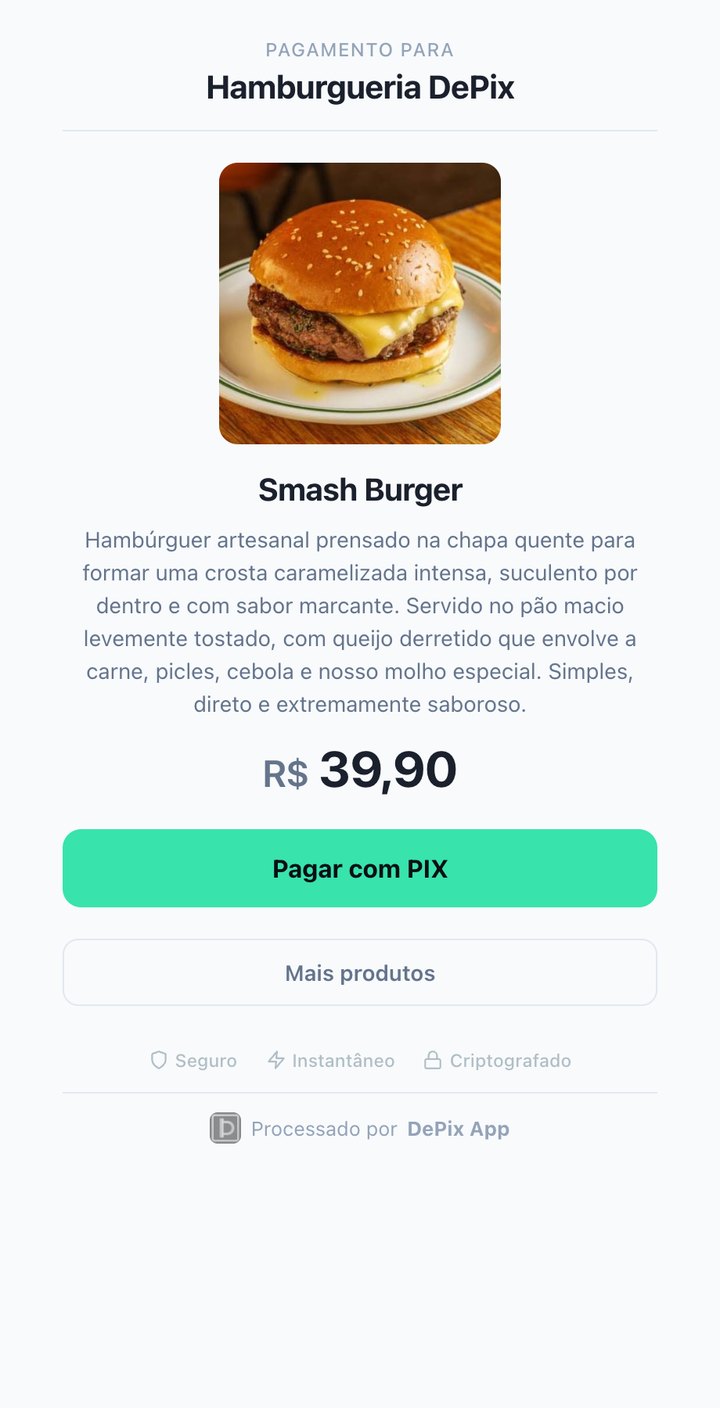
The second way is to register products. Under My Products you set a name, price, description, and even an image, and each product gets a permanent link in the format pay.depixapp.com/yourusername/product-name. That link never changes, so you can use it to sell the same item as many times as you want — with a photo, description, and price. Here is a real example of a product page, exactly as your customer receives it:
What the customer sees on the checkout page
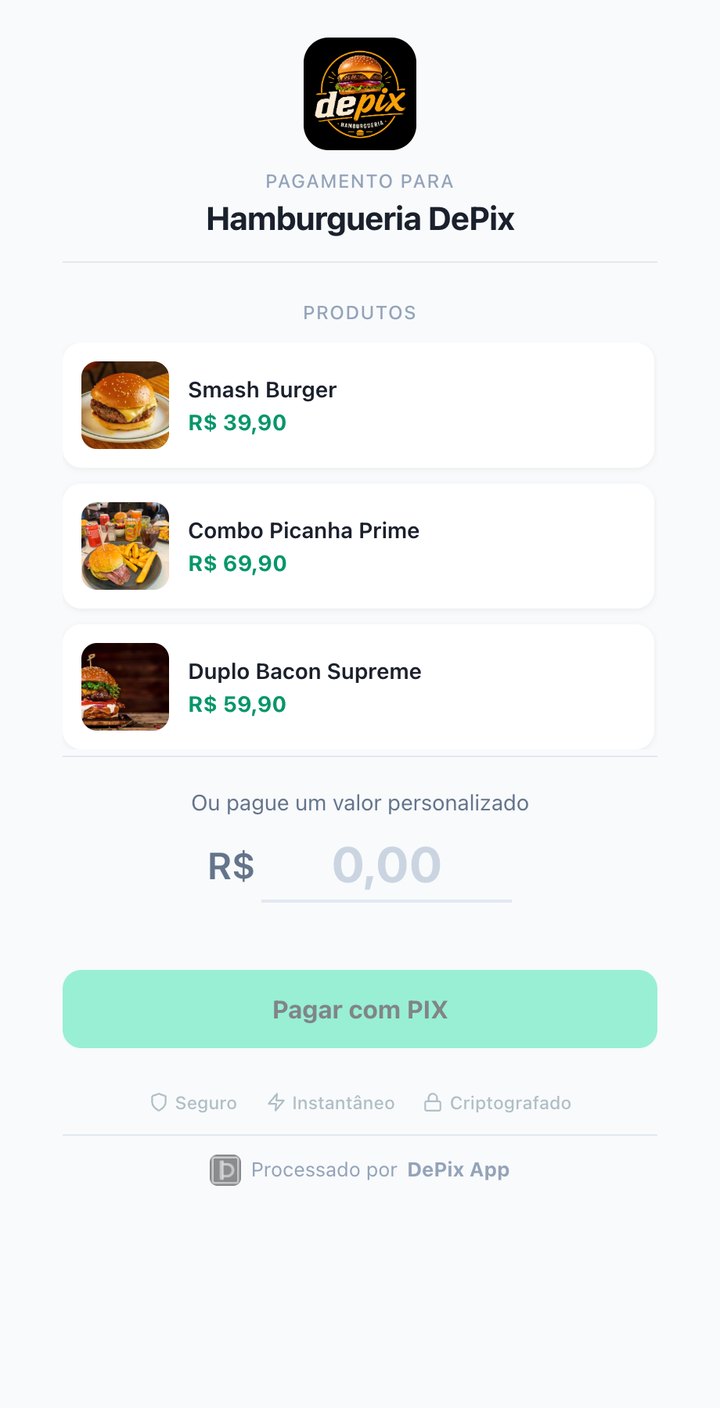
When the customer opens the payment link, they land on a checkout page hosted by the DePix App — clean, secure, and with your store’s name and logo front and center. There is no sign-up, no login, and no app to install. The page shows your product storefront, with photo and price, and also lets the customer pay a custom amount.
The customer does exactly what they already know: they pick a product or type the amount, tap Pay with Pix, open their banking app, scan the QR code (or use copy-and-paste), and confirm. As soon as the payment clears, the screen switches to “Payment confirmed” — and if you configured a return URL, the customer is redirected back to your site automatically. From the customer’s point of view, it is just a regular Pix payment³: zero crypto knowledge on their end.
How the payment reaches you
Behind that simplicity is the DePix App flow. The customer pays in reais, via Pix, and you receive DePix — the stablecoin pegged to the Brazilian real (1 DePix = 1 real) on the Liquid Network — straight into your non-custodial integrated wallet. The keys stay on your device; the DePix App never holds your money. Here is the full path, from link to wallet:
Because you receive in DePix, you keep privacy over your cash flow and real self-custody — a world apart from funneling everything into an exposed bank account. Whenever you want, you can withdraw to your bank via Pix or convert to USDt and L-BTC inside the app itself.
Track sales and export reports
Every paid charge shows up under My Sales. At the top, you get an at-a-glance view of your business: total sales, amount received, conversion rate, and pending charges. You can filter by product, status (pending, processing, completed, expired, cancelled), and period — today, 7, 30, or 90 days, or a custom range — and also search by product, description, ID, or amount.
Need a report for your accountant? Just choose the date range and request the report by email, which arrives in a format ready for review and export (PDF/CSV). That way you close the month without a manual spreadsheet and with everything traceable.
Why sell with a payment link and checkout page
Putting it all together, the DePix App checkout page solves the main pain points of selling:
- No card terminal and no hardware: you only use your phone.
- No barrier for the customer: they pay with an ordinary Pix, no new app and no crypto.
- Simple, transparent fee: 2% + R$ 0.99 per charge, competitive with debit cards.
- Sovereign settlement: the money arrives as DePix in your non-custodial integrated wallet.
If you also run a website, online store, or bot and want to automate charge creation, the next step is the API. See how to accept Pix and crypto payments on your website with the DePix App API and integrate the checkout page into your system².
References
Your financial privacy starts here
Getting paid by Pix is convenient — getting paid in DePix is convenient and private. Stop exposing every sale to the banking system and start using a payment link that delivers digital money only you control. Visit depixapp.com and create your first charge.