
DePix Integrated Wallet: Complete Guide
If you have ever felt nervous about getting into crypto, the reason is almost always the same: “where do I actually keep my digital money?” Separate apps, intimidating addresses, the fear of one wrong move wiping out your balance. The DePix integrated wallet removes that friction entirely — a full non-custodial wallet you create right inside the DePix App in under a minute, with nothing else to install. In this guide you will learn what the integrated wallet is, how to set it up safely, and how to use every feature in your daily routine.
What the integrated wallet is and why it is non-custodial
The integrated wallet is the digital wallet that lives right on your phone. It holds your DePix, USDt and L-BTC on the Liquid Network, all in one place. The most important detail comes down to a single word: non-custodial.
Non-custodial means only you hold the keys to your money. When you create the integrated wallet, the app generates 12 secret words (your recovery phrase) that stay on your device. Those words are the only way to access and restore your funds. The DePix App never holds that money, never has access to your 12 words, and cannot touch your balance. That is the opposite of a traditional exchange, where the company keeps your coins and you have to trust that it will not disappear, freeze your account, or get hacked.
This is the essence of financial sovereignty: money that only you control. If you want to dig into the philosophy behind it, our piece on private payments with DePix is a good next read.
How to create your integrated wallet step by step
Setting up the wallet takes less than a minute, and the app walks you through every stage. The flow has five simple steps.
1. Start the setup. In the app, tap “Set up your wallet” and then “Create new wallet”. The app explains that you will need pen and paper, and that you should be somewhere private with nobody looking over your shoulder.
2. Write down the 12 words. The app shows your 12 secret words in order. Write all of them on paper, in the exact order shown. The golden rule: do not take a screenshot and do not save them in a phone note. Phones get stolen, broken, or hacked — paper kept somewhere safe is what protects your money. Ideally, make two copies and store them in different locations.
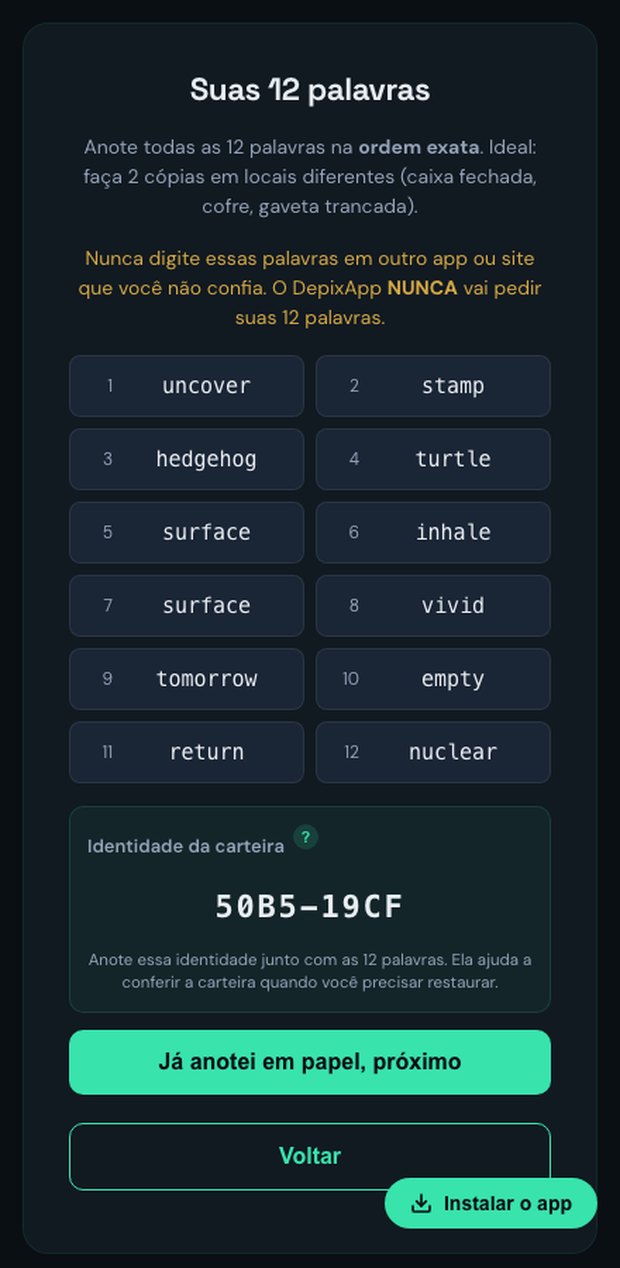
3. Confirm the words. To make sure you copied everything correctly, the app asks you to tap the right word in four random positions. Alongside the 12 words, the app also shows the wallet identity — a short 8-character code that works like a public fingerprint. It does not grant access to your money (only the 12 words do), but it helps you confirm you restored the right wallet later on.
4. Set a 6-digit PIN. You choose a 6-digit numeric PIN that authorizes outgoing transactions. It is separate from your app login password. Heads up: if you enter the PIN wrong 5 times in a row, the wallet is wiped from that device as a security measure — but your funds stay safe and you restore everything with the 12 words.
5. Enable biometrics (optional). Finally, you can turn on Face ID or Touch ID to send money without typing the PIN every time. Your key stays protected by the phone’s hardware. If your device has no compatible biometrics, everything still works with the PIN alone. That’s it — your integrated wallet is live.
The five features of the integrated wallet
With the wallet created, you have five core actions at your fingertips. Here is how each one works.
Receive. Tap “Receive”, choose the asset (DePix, USDt or L-BTC), and the app generates a Liquid address with a QR code. Copy the address or show the QR to whoever is sending you funds. This is how you accept a payment or move money from another wallet into yours.
Send. Tap “Send”, choose the asset, enter the amount (or use “Max” for the full balance), and paste the destination address. The app shows a review with the amount, the network fee, and the total debited before you confirm with your PIN or biometrics.
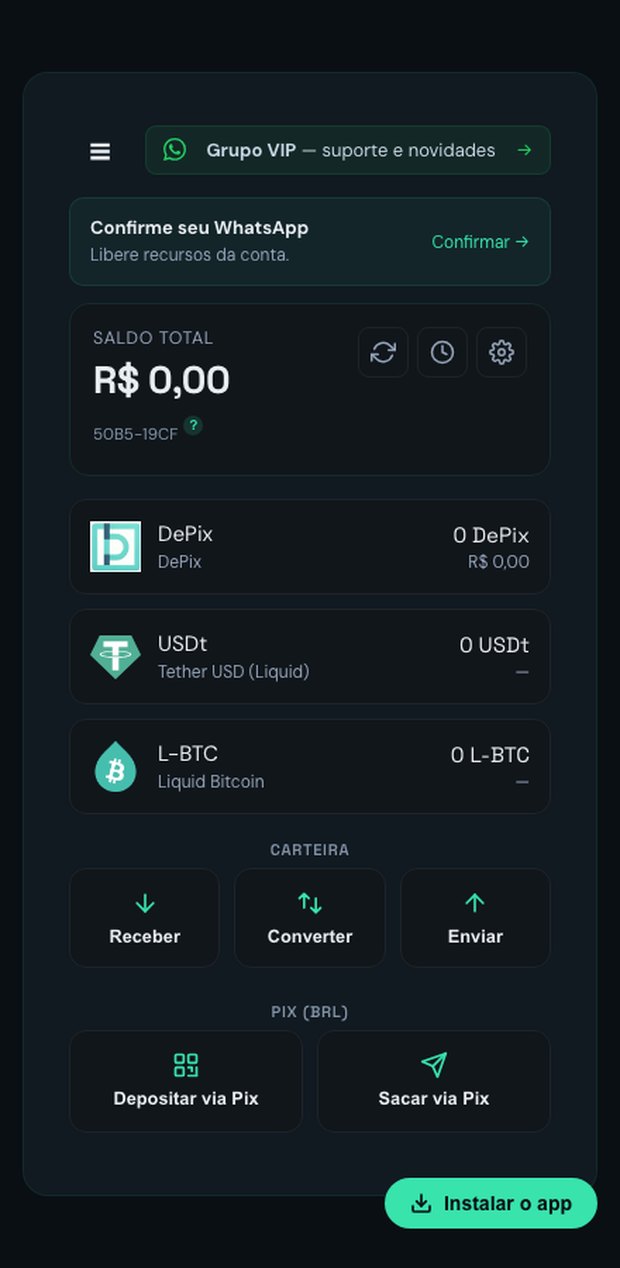
Convert. Here is a powerful differentiator: you swap your assets inside the app itself, with no other platform required. Convert DePix into USDt for dollar exposure, or into L-BTC to save in Bitcoin. The app shows the quote, the fee, and an expiry time before you confirm. Convert also covers peg-in and peg-out: you turn on-chain Bitcoin into L-BTC (peg-in) and L-BTC back into Bitcoin (peg-out) without ever leaving the wallet.
Deposit via Pix. In the wallet’s Pix section, tap “Deposit via Pix”, enter the amount, and the app generates a Pix QR code (with a copy-and-paste option). You pay from your own bank app and the DePix lands straight in your integrated wallet — no address to paste anywhere. Processing goes through an anti-fraud security window before the funds land — the exact wait depends on your account and is always shown in the app before you pay — leaving time to trigger the Special Refund Mechanism (MED) and protecting you against Pix scams.³ The fee is 2% + R$ 0.99, with a R$ 5 minimum and a R$ 6,000 daily cap per CPF.¹ For the full walkthrough, see how to buy DePix .
Withdraw via Pix. The path back out: tap “Withdraw via Pix”, enter the amount and your Pix key. The app generates a Liquid address, you send the DePix from your wallet, and the reais land in your bank account via Pix.
Security: how your wallet is protected
The integrated wallet was designed with layers of protection that run on your own device. The 12 words and the private key never leave the phone and are encrypted at rest with Argon2id and AES-256-GCM — modern standards recommended for protecting secrets.² The PIN, derived with Argon2id, is what unlocks the signature for each outgoing transaction, and the app locks the key again right after every operation.
Brute-force protection is twofold. From the third wrong attempt onward, the app enforces a delay between tries. And, as noted above, five wrong PIN entries wipe the wallet from that device — so even if someone steals your phone, they cannot keep guessing the PIN indefinitely. Because your funds live on the blockchain and not on the device, you simply restore the wallet on any device with your 12 words to recover everything.
It is worth repeating the single most important point of any self-custody: your 12 words are you. Whoever has the words has the money. So keep them on paper, in a safe place, and never type them into any site or app that is not the DePix App. The DePix App team will never ask for your 12 words — anyone who does is trying to scam you.
Bitcoin, DePix and USDt: each in its right place
Holding all three assets in the same wallet is convenient, but each one serves a different purpose. DePix is pegged 1:1 to the Brazilian real and built for private, sovereign everyday payments — not for storing value, since the real loses purchasing power to inflation. USDt tracks the US dollar and helps you hedge against a depreciating local currency. And L-BTC is Bitcoin on the Liquid Network, a sidechain run by a federation, with stronger privacy through Confidential Transactions² — ideal for anyone who wants to save in the best store of value of the past two decades. In short: use Bitcoin to save, use DePix to spend with privacy.
References
- DePix App — Deposit fees, limits and processing
- Blockstream Liquid Network — Confidential Transactions and technical overview
- Central Bank of Brazil — Pix: what it is and how it works
Your financial privacy starts here
Pix has convenience — DePix has privacy. With the integrated wallet, control of your digital money is literally in the palm of your hand, and yours alone. Stop exposing every transaction to the banking system and start using money that only you control. Visit depixapp.com .